TOYOPUC Computerlink — PCwin settings
Use this guide for the following TOYOPUC families configured with PCwin.
| Product family | Hardware |
|---|---|
| TOYOPUC Plus | Plus CPU, Plus EX2 |
| TOYOPUC PC10G | PC10G-1SP, PC10G, EF10, 2PORT-EFR |
| TOYOPUC PC3J | PC3JX-D, PC3JG |
TOYOPUC Nano uses the PCwin2 guide instead.
What you need
- Engineering tool: PCwin
- PLC network: An IP address, subnet mask, and gateway appropriate for your network
- After configuration: Power cycle the PLC to apply the link parameters
Example values used in this guide
| Parameter | Example value | Notes |
|---|---|---|
| PLC IP address | 192.168.250.100 |
Replace with the address assigned to the PLC |
| TCP port | 1025 |
PLC-side Computerlink TCP port |
| UDP port | 1035 |
PLC-side Computerlink UDP port |
| UDP peer PC | 192.168.250.120:12000 |
Replace with the PC address and fixed UDP local port |
PLC-side settings
1. Select the Ethernet link
Open Parameter → Link Parameter. Select the Ethernet entry for the
built-in port or communication module used by the project, then select
Detail. Rack, slot, link number, and port position depend on the PLC
configuration.
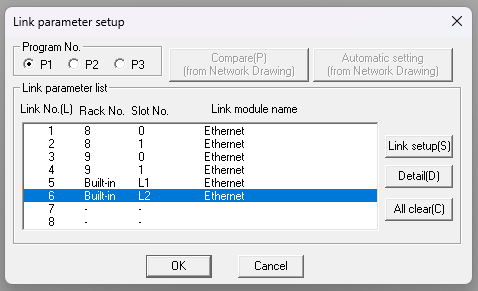
Select the Ethernet link that is connected to the PC.
2. Configure the TCP and UDP connections
Enter the following values in the Ethernet detail screen.
| Parameter | Setting |
|---|---|
| Own Node IP Address | 192.168.250.100 (example) |
| Connection 1 Used | Enabled |
| Connection 1 Open Protocol | TCP Destination Non-Specified Passive Open |
| Connection 1 Own Node Port No. | 1025 |
| Connection 1 Other Node Table No. | 0 |
| Connection 2 Used | Enabled |
| Connection 2 Open Protocol | UDP |
| Connection 2 Own Node Port No. | 1035 |
| Connection 2 Other Node Table No. | 1 |
| Initialize | Initialization based on Link Parameter |
Do not select initialization based on the Initial Sequence Program for this procedure.
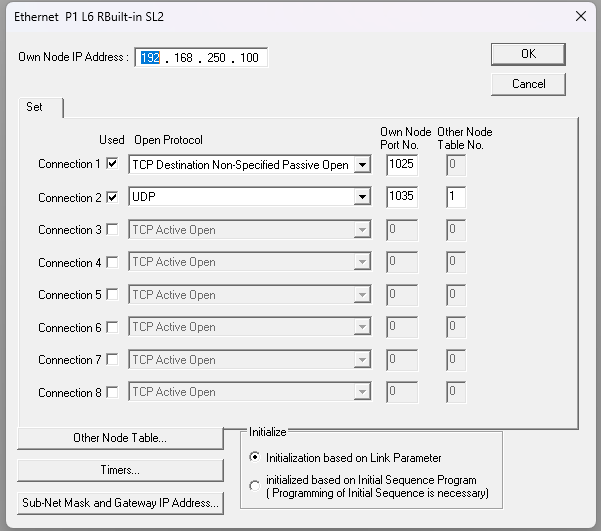
TCP uses non-specified passive open; UDP references Other Node Table 1.
3. Configure the UDP peer
Open Other Node Table and configure Table 1.
| Parameter | Setting |
|---|---|
| Table 1 Used | Enabled |
| Other Node IP Address | 192.168.250.120 (example PC address) |
| Other Node Port No. | 12000 (example fixed PC UDP port) |
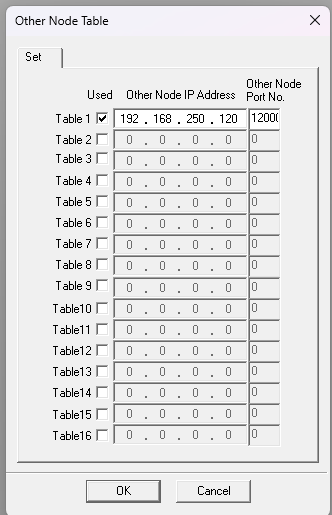
UDP requires a fixed peer entry in the PLC link parameters.
The Computerlink application on the PC must bind its UDP local port to the
same value entered in this table. For this example, use LocalPort = 12000 in
.NET or local_port=12000 in Python. A value of 0 selects an arbitrary free
port and does not match this PLC configuration.
4. Apply the parameters
Write the updated parameters to the PLC, then power cycle the PLC. Start with a read-only connection check after the PLC restarts.
Connection check
| Transport | PLC endpoint | PC-side requirement |
|---|---|---|
| TCP | 192.168.250.100:1025 |
Connect normally; the PLC uses non-specified passive open |
| UDP | 192.168.250.100:1035 |
Bind UDP local port 12000 |
For connection errors after the PLC-side setup is complete, see Computerlink Troubleshooting & Codes.